
MySainsburys Registration: (2026 Guide)
Just started at Sainsbury’s and trying to figure out how to register for MySainsburys? You’re in the right place. But before anything else, here’s the most important thing to know. There is no online self-registration for MySainsburys. You cannot sign yourself up. Your account is created by Sainsbury’s HR during your induction. Once it’s active, go to oursainsburys.co.uk, enter your Sainsbury’s email address, and use your National Insurance number in UPPERCASE (e.g. AB123456C) as your default password.
This guide covers everything about how the registration process works, how to log in for the first time, what to do if your account isn’t ready yet, and how to fix common login problems.
What Is MySainsburys and What Do You Get Access To?
It is the official Sainsbury’s employee portal now rebranded as OurSainsburys. The old address mysainsburys.co.uk redirects automatically to oursainsburys.co.uk. Both take you to the same place.
Once your account is active, you can access:
- Payslips — view and download current and past payslips
- P60 and P11D annual tax documents
- Work rotas and shift schedules
- Holiday and annual leave requests
- Personal and bank details for payroll
- Company news, HR policies, and updates
- Colleague discounts via the linked Love It platform
- Time and attendance via Kronos (UKG Pro)
Without a registered account, none of this is accessible. Getting your login sorted as early as possible is important.
How MySainsburys Registration Actually Works
This is where most guides mislead new starters. There is no Register button on the OurSainsburys website, no sign-up form, and no way to create your own account online. The portal is an internal HR system. Only Sainsbury’s HR can create accounts.
Here is exactly how the process works, from job offer to first login:
1. You accept your job offer and Sainsbury’s HR begins setting up your employee record
2. HR creates your account on the system — this is your registration
3. Your Sainsbury’s email address is generated: firstname.lastname@sainsburys.co.uk
4. Your default password is set to your National Insurance number (uppercase, no spaces)
5. At your induction, your manager walks you through the portal
6. You log in for the first time at oursainsburys.co.uk
7. You are asked to set a new password — do this immediately
Your account may not be active on your very first day. It can take up to 24 to 48 hours after your induction for the system to fully activate. This is normal — do not worry if you cannot log in on day one.
What You Need Before Your First Login
| What You Need | Details |
| Sainsbury’s Email | firstname.lastname@sainsburys.co.uk — confirmed at your induction |
| Default Password | Your NI number in UPPERCASE with no spaces — e.g. AB123456C |
| Employee Number | On your contract or provided by your manager |
| Device | Laptop, desktop, tablet, or smartphone all work |
| Browser | Chrome, Edge, or Firefox are recommended |
| Phone Number | Required if two-factor authentication (MFA) is set up |
Not sure of your email address? Ask your line manager or HR directly. Do not guess too many failed login attempts will lock your account.
How to Log In for the First Time — Step by Step
On Desktop or Laptop
- Go to oursainsburys.co.uk in your browser
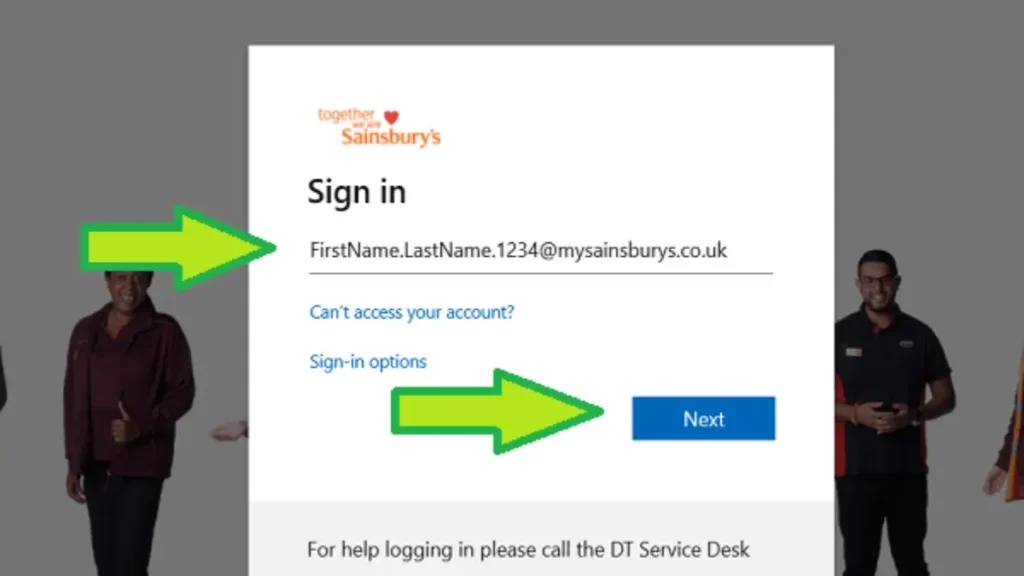
- You will see a Microsoft 365 login screen — this is completely normal and official
- Enter your Sainsbury’s email address and click Next
- Enter your default password: your NI number in UPPERCASE with no spaces
- Click Sign In
- You will be asked to create a new password — choose something strong
- Set up Multi-Factor Authentication (MFA) if prompted — see Section 5
- You will land on your OurSainsburys colleague dashboard
Why does it look like a Microsoft page? Sainsbury’s uses Microsoft 365 to manage all colleague accounts. The Microsoft login screen is the official, secure way to access the portal. It is not a fake site.
On Your Phone — Colleague Hub App
- Download the Colleague Hub app from the App Store (iPhone) or Google Play (Android)
- Open the app and tap Sign In
- Enter your Sainsbury’s email and password
- Complete any MFA verification if shown
- You’re in — access payslips, rota, and shifts directly from your phone
Setting Up Multi-Factor Authentication (MFA)
After your first login, you may be asked to set up MFA. This adds a second security step — usually a code sent to your phone — to confirm it is really you logging in.
Setting up with the Microsoft Authenticator app:
- When prompted, select Set up MFA or Keep your account secure
- Download the Microsoft Authenticator app (free on App Store or Google Play)
- Open the app, tap Add account, then choose Work or school account
- Scan the QR code on your screen
- Your account is linked — the app generates a new 6-digit code every 30 seconds
- Enter the code when asked each time you log in
Prefer a text message instead? Choose Phone on the MFA setup screen and select Text me a code. You will receive an SMS each time you log in. To change your MFA method later, call the IT Service Desk on 0345 603 2638.
First Login Checklist — Do These Straight Away
Once you are logged in for the first time, take five minutes to complete this checklist:
- Change your default password immediately — your NI number should never stay as your password
- Set up MFA to protect your payslip and personal data
- Go to MyHR and check your bank account details are correct — wrong details means your wages go to the wrong account
- Check your tax code — it should show 1257L. If it shows W1, M1, or X you are on emergency tax. Hand in your P45 or contact HMRC on 0300 200 3300.
- Bookmark oursainsburys.co.uk so you always use the official site
- Download the Colleague Hub app for quick mobile access
What If HR Has Not Set Up My Account Yet?
This is one of the most common frustrations for new starters, and most guides completely ignore it. Here is what to do:
- Wait 48 hours from your induction date — system activation can take time
- Speak to your line manager — they can contact HR and check your account status
- If still unresolved, call the Colleague Support Centre on 0800 707 6242
- Have your employee number and National Insurance number ready when you call
If you urgently need proof of income — for example for a tenancy or mortgage application — ask HR for a written earnings confirmation letter as a temporary alternative while you wait for portal access.
How long should it take?
Most accounts are active within 1 to 3 working days of induction. If more than 5 working days have passed and you still cannot log in, escalate to HR straight away. Do not just wait.
Common Login Problems and How to Fix Them
Default Password Not Working
- Your NI number must be in UPPERCASE with zero spaces — e.g. AB123456C
- Double-check your NI number on your NI card or a previous P60
- If it still fails after 24 hours, call the Colleague Support Centre on 0800 707 6242
Forgot Your Password
- Go to oursainsburys.co.uk and click Sign In
- Click Can’t access your account? on the Microsoft login page
- Enter your email address and follow the reset steps
- Still stuck? Call the IT Service Desk on 0345 603 2638
Account Locked Out
Accounts lock automatically after several failed login attempts. You cannot unlock it yourself. Call the IT Service Desk on 0345 603 2638 — they will unlock your account and reset your credentials.
Page Not Loading or Browser Errors
- Clear your browser’s cache and cookies
- Try a different browser such as Chrome, Edge, or Firefox
- Open an incognito or private browsing window and try again
- Double-check you are on the correct URL: oursainsburys.co.uk
Warning About Fake MySainsburys Websites
There are many unofficial third-party websites using names that look like the real portal — including mysainsburys.net, oursainsburys.live, mysainsburys.pro, and others. These are NOT official Sainsbury’s websites.
The only official Sainsbury’s colleague portal is: oursainsburys.co.uk
Never enter your email, password, or any personal details on any other site. Bookmark the official URL today and always use your saved bookmark to log in safely.
Conclusion
Setting up your MySainsburys account is simple. You cannot register yourself because HR creates the account during your induction. To access it, go to the official website and log in using your Sainsbury’s email and your NI number as the default password, then change the password immediately. After logging in, check important details like your bank information and tax code to avoid problems with your first salary. If your account is not active yet, wait about 48 hours and speak with your manager or contact the Colleague Support Centre for help. Always use the official website and avoid third-party sites to keep your login details safe.
Frequently Asked Questions